


Cybercriminals are always looking for ways to get at our personal information—and, ultimately, our money. And their tactics are evolving along with the rapid advances in technology, particularly artificial intelligence.
To help keep the good guys a step ahead, financial institutions like SELCO have implemented—and continually enhance—multi-layered security controls designed to protect member information, ranging from strong credential management to monitoring for suspicious patterns of behavior. One effective method is to ensure that digital banking users prove their identity in multiple ways. When multi-factor authentication (MFA) is employed, users must typically be verified through at least two of the following factors:
- Something you know: Username, password, or PIN
- Something you have: A “remembered device,” security key, one-time code, etc.
- Something you are: Biometrics such as fingerprint or Face ID.
SELCO offers members multiple options for authentication, including biometric login, mobile push authentication, one-time codes provided by authenticator apps, and one-time codes (security codes) delivered via phone, email, or text message.
When choosing a “something you have” option, which method is better? More secure? More user-friendly?
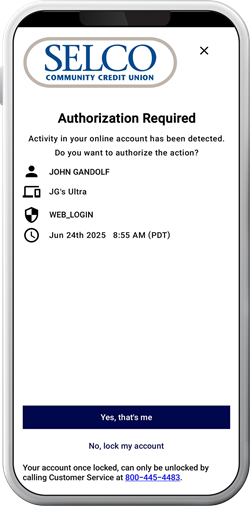
While opinions vary, the National Institute of Standards and Technology, a leading authority on cybersecurity, recommends push authentication over one-time codes sent via phone, email, and text because of its extra level of security and convenience. SELCO also highly recommends push authentication when our members log in and use various services in digital banking. Push notifications are now the primary, default method for SELCO members to receive security alerts.
“To stay ahead of modern scams, it's important to use up-to-date security identity verification methods,” said Chelsea Budzko, Information Security Officer at SELCO. “Switching to push authentication through trusted apps or enabling an authenticator app can significantly strengthen the safety of your login process. Push authentication has the added benefit of enhanced security and more convenience.”
What is push authentication?
Push authentication is a mobile-centric component of multi-factor authentication for verifying a user’s identity. It is widely used by financial institutions, online shopping sites, healthcare providers, and many other sites and industries. In addition to enhanced security, push authentication improves the user experience by removing friction. Users can tap a button or swipe a screen to authorize or deny an action—eliminating the need to manually type security codes.
How does it work?
The graphic below shows what the authentication process looks like in SELCO’s digital banking platform when push authentication is enabled on a device. This imagery details a mix of steps taken during the login process or other trigger points for push notifications throughout the digital banking experience.
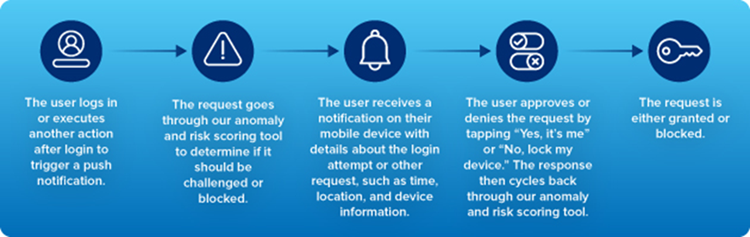
Once authenticated, SELCO members are securely logged in. If an authentication challenge is required after login (for example, when users add a card to their mobile wallet, update their profile or password, or add an external account), another push notification is sent to authorize the activity. The user can conveniently tap the “It’s me” button to let us know the activity is authorized.
Here’s how to enable push authentication in a few easy steps in digital banking.
What makes push authentication so secure?
Great question! Here are a few reasons why push authentication is widely accepted as a preferred form of ID verification:
- Direct ties to a device. Authentication requests are only sent to the user’s registered device. It’s much more difficult to steal a device than compromise an email account or intercept text messages.
"Unlike SMS codes, push notifications aren't vulnerable to SIM swap scams, where attackers hijack your phone number to intercept security codes," Budzko said.
- Asymmetric cryptography. This simply means a device user’s unique digital signature is required to authenticate a login request.
- Suspicious activity monitoring. If you receive a push notification you don’t recognize, you can immediately block access. SELCO provides additional context in the push authentication messages to help a user detect potential phishing attacks in real time.
If you’re looking for a more secure and seamless method for verifying your identity, push authentication is the way to go. Adding even one careful step to your verification process can go a long way toward bringing you more convenient security and peace of mind.


