
Blue checking accounts icon

Protect Your Accounts From Fraud & Scams

Dad with little kids on the floor with laptop.

What is account takeover fraud, and how can you prevent it?

Fraudsters are moving beyond system hacks to target you directly through phishing, smishing, and social engineering. By tricking you into revealing security codes, they can hijack your entire digital banking profile in minutes.
Identify fraud and scams

Recognize these four essential warning signs to protect your digital banking security.

1/4

Unexpected emails, calls, or texts

Be extra diligent when unexpected emails, calls, or texts come your way. Always verify the source independently before responding.

2/4

Unrealistic promises

Beware of offers that seem too good to be true, including promises of discounts much lower than market prices.

3/4

Poor reviews and ratings

Search for reviews and testimonials about the site or business and check ratings on trusted sites like the Better Business Bureau (BBB).

4/4

Strange URLs

Unsecured websites (missing the “https” or padlock symbol) and obscure URLs should give you pause.

Security and privacy FAQs

To protect yourself from fraud, maximize your account security, and actively prevent unauthorized transactions, we encourage you to use these two digital card management tools:

  • Fraud text alerts. By opting in to receive fraud text alerts, you’ll get a text message rather than a phone call when there is suspected fraud on your card.
  • Card controls to lock your card(s). Available in digital banking, card controls allow you to lock and unlock your SELCO cards right from your phone. For extra security, keep your card locked and simply unlock it temporarily while making a transaction.

Multi-factor authentication is a security system designed to ensure you are who you say you are and that you’re the only person who can access your account. The first factor is your normal username and password, and the ensuing factors come via one of these methods:

  • A code sent to your device or generated from an authentication app. SELCO Digital Banking employs Google Authenticator, a more modern option that requires less frequent authentication requests while still providing the benefit of added protection.
  • One-time codes sent via text, voice call, or email.
  • One-time calls from SELCO’s Service Center.
  • Fingerprint/Face ID.
  • Push notifications.

For even more security, you can opt to be doubly authenticated each time.

Yes, SELCO will request personal information for verification purposes if you call us. However, SELCO does not make outbound calls from our 800 number and will never send you a text asking for your:

  • Personal Identification Number (PIN).
  • Full SSN (though we may ask for it when you call us).
  • Three-digit code on the back of your card.

If you’re ever unsure you’re speaking with a SELCO representative, hang up and call us directly at 800-445-4483.

If you suspect you are a victim of fraud, you should do the following:

  • Immediately contact your financial institution.
  • Monitor your credit. Visit annualcreditreport.com for free credit reports (check every four months for regular monitoring). ​
  • Report any internet crimes to IC3.gov.
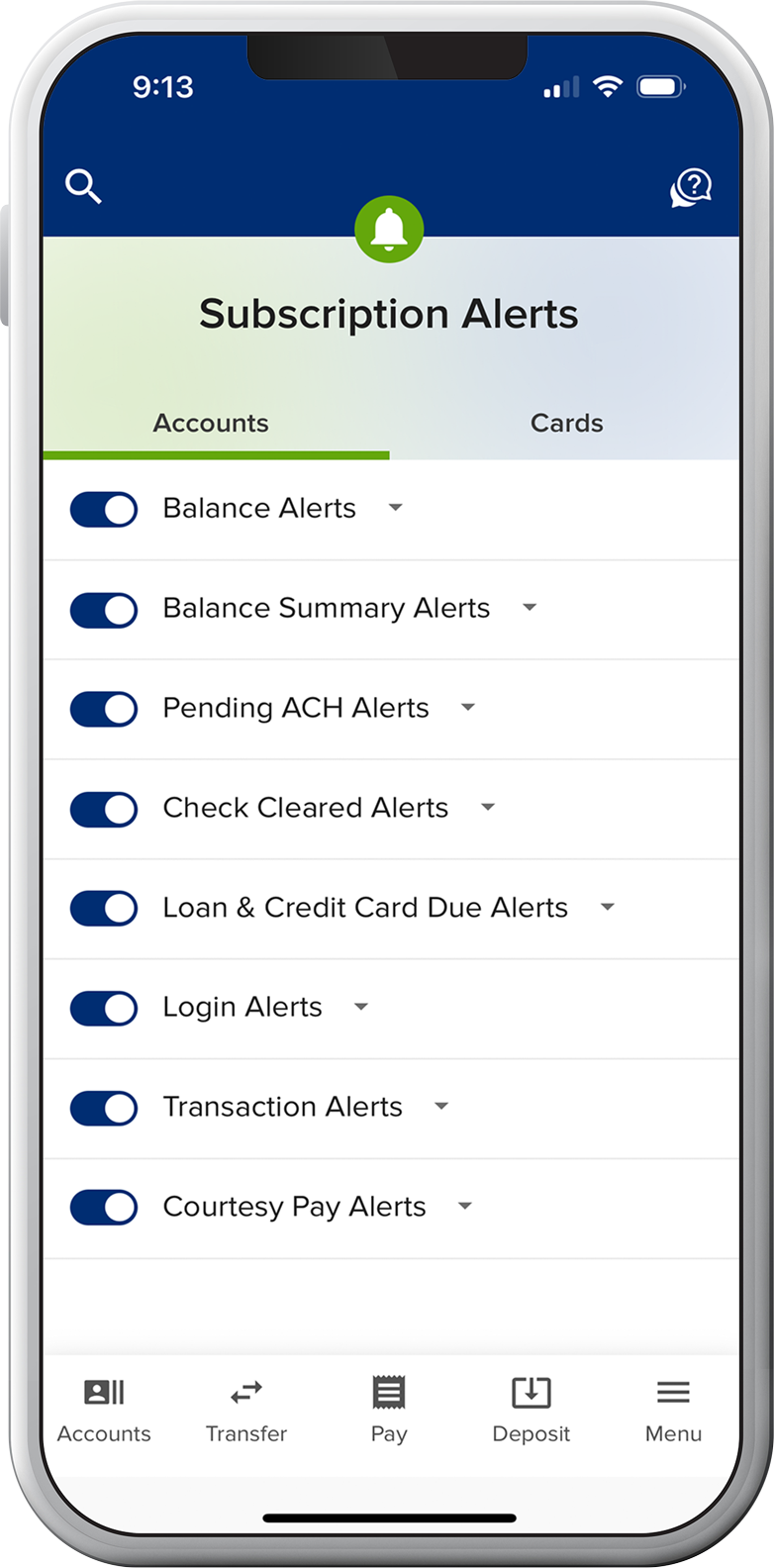
SELCO community credit union subscription alerts options in the mobile app.

Steps you can take as a SELCO member to protect your accounts

Turn on card controls blue check mark icon.

Turn on Card Controls

Turn your cards off and on instantly, set controls and alerts by amount or transaction type, and add travel notices to prevent declines when you’re away from home.  

Set transaction alerts blue check mark icon.

Set Transaction Alerts

Receive email or text alerts when checks clear, loans are coming due, suspicious activity occurs on your account, and more. 

Allow Voice Authentication (Voice ID)

Voice ID makes it much quicker to verify you when you call. And by analyzing thousands of voice characteristics to create a unique voiceprint, it’s nearly impossible for fraudsters to bypass, even with advanced AI techniques like deepfakes. 

Enable fingerprint/face ID and mfa2 blue check mark icon.

Enable Fingerprint/Face ID and Push Authentication

Log in to digital banking quickly, securely, and uniquely. You can also opt in to push authentication to boost your security while verifying yourself with the tap of a button (SELCO mobile app required). Or, switch from receiving text/phone security codes to using an authenticator app of your choice. Push notifications are more secure than receiving security codes.

Women looking at her phone with laptop in front of her.

How to identify romance, family, and friend scams

These scams usually start online and occur when a new love interest or distant relative spends time getting to know you, developing trust before making:

  • Requests for money or a loan.
  • Requests for travel, medical, or emergency expenses.
  • Promises of a fortune for digital payments like crypto, wire transfers, or gift cards.

FCC's list of current scams

To maintain strict account security, cross-reference your data protection habits with the official Federal Communications Commission Frauds, Scams, and Alerts Guide. It provides live updates on evolving communications risks, caller ID spoofing, robotext phishing, and malicious tactics used to hijack online banking credentials.