SELCO branches and contact centers will be closed Monday, February 16 in observance of Presidents' Day. Account access and support will still be available through digital banking and our virtual phone assistant.

Some members may experience intermittent access to digital banking. We apologize for the inconvenience and are working with our vendor to resolve the issue as quickly as possible.

Add Usernames to the Login Dropdown

  1. Step 1

      On the digital banking login screen, select Login with another username.  
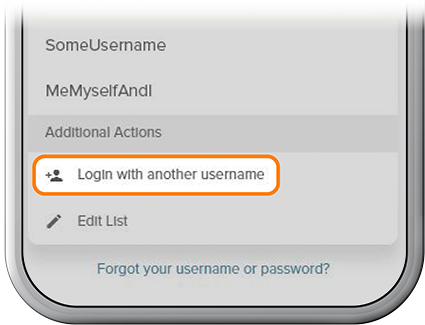
    Add Usernames to the Login Dropdown in the SELCO community credit union step 1
  2. Step 2

    Type in the username and password from your other account. To save the username to the list, be sure to switch on the Remember Username. Then press Login.
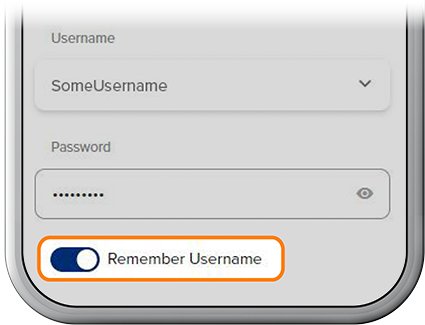
    Add Usernames to the Login Dropdown in the SELCO community credit union step 2
  3. Step 3

    To log in with another username but NOT save it to the dropdown list, enter a new username and password (without switching on Remember Username), then press Login.
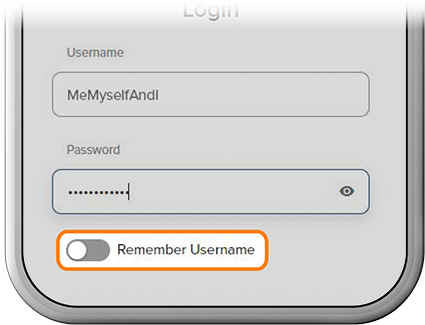
    Add Usernames to the Login Dropdown in the SELCO community credit union step 3
  4. Step 4

    To remove a saved username, select Edit List, then delete the username.
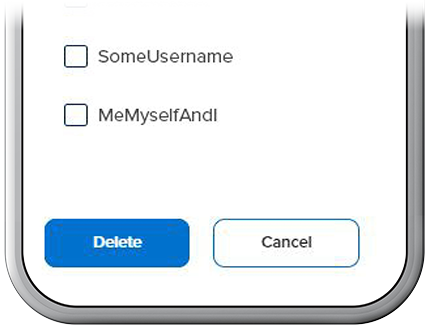
    Add Usernames to the Login Dropdown in the SELCO community credit union step 4